


Warning! This article is out of date!
The described method of free IMEI extension in Turkey has been cancelled. And in the summer of 2023, the cost of registration rose to an absurd 20,000 Turkish liras (almost 700 euros). Too bad if you didn’t register your phone timely. Hardly makes sense now….
What’s the problem with the phones in Turkey?
As you know, 120 days after you put a Turkish SIM card in your phone that you imported from abroad, it will be blocked by IMEI. We wrote more about this in an article about the use of foreign phones in Turkey.
You can continue to use your phone, but only with foreign SIM cards. In order to use it with Turkish SIM cards, its IMEI must be officially registered. And phone registration in Turkey is expensive. As of this writing, the cost of registration is 2,700 Turkish Liras (more than 150 euros)!
But we have one, perhaps temporary, tiphack on how to unblock and extend your duty-free permit to use a foreign terminal in Turkey if you have a residence permit.
What exactly is blocked?
If your phone is already blocked, first of all you need to understand what exactly you have blocked: the terminal (phone) or the SIM card (phone number)? This can be understood either by SMS messages in your phone from the addressee YASALUYARI (do a message search), or simply by going to your operator’s office and asking the representative.
If it turns out that you have a blocked IMEI and you already have a residence permit (kimlik), then welcome to the secret section of our site 😉
Lifecycle
Since my wife is a photographer in Turkey, we can’t afford to live without a Turkish phone number. Therefore, we were forced to look for workarounds. And we found them!
The tip that we’ll describe below allows you to unlock your phone for free. The procedure is simple enough:
- Get password from e-devlet.
- Log in to e-devlet and remove the phone lock for 30 days.
- After the phone locks again (or shortly before), repeat the procedure. There is no guarantee that it will work a second time. But people say they’ve been doing this procedure for over a year. True, before, the additional period was not 30 days, but 120 days. Now this period has been reduced to 30 days. (Note: if you use this for more than a year, you could lose your phone registration rights altogether. Read more in the article below).
How do I get the password from E-Devlet?
To do this, just go to any nearest post office and ask for the password for the e-devlet. We have a separate, more detailed article about this called: How do I get the password from E-Devlet?
Free phone unlocking procedure
If you have already obtained an E-Devlet password, proceed to the following steps:
1. open the login page of the service page for phones
Enter the E-Devlet on the “Kullanım Süresi Uzatma” form. This can be done in two ways: 1) open directly from the link https://www.turkiye.gov.tr/btk-kullanim-suresi-uzatma, 2) if this link at the time of reading this article for some reason is no longer available, go to the home page of the site and try typing “Kullanım Süresi Uzatma” in the search bar.
2. Press the confirm button
On the page that appears, click“Kimliğimi Şimdi Doğrula” (confirm my identity).

3. Enter your E-Devlet login and password
This will open the e-devlet login page, where you will be prompted to enter your cimilic (residence permit) number and password.
Enter the number of your residence permit in the field for the number of the cimlik.
And in the floor of the E-devlet Sifresi enter your password.
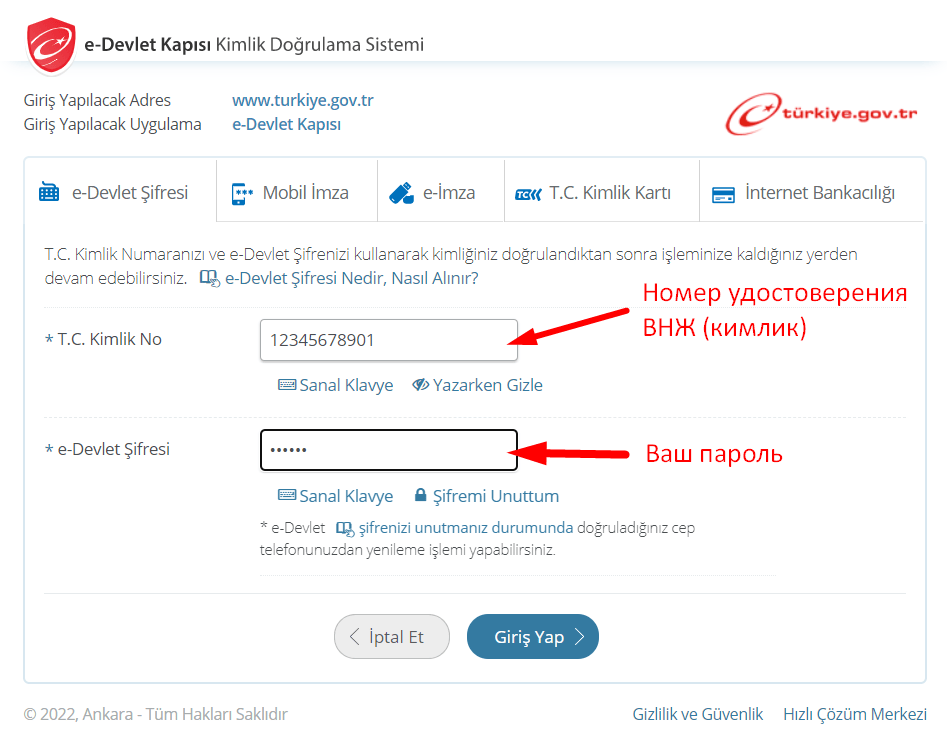
After that, press Giriş Yap.
Congratulations! You went straight to the free foreign phone’s IMEI unlocking page. If not, search for “Kimliğimi Şimdi Doğrula” again and it will take you to the registration page.
4. Confirmation of the terms of service
If you got it right, the first thing you will see is this warning, a brief translation of which I’ll give below.
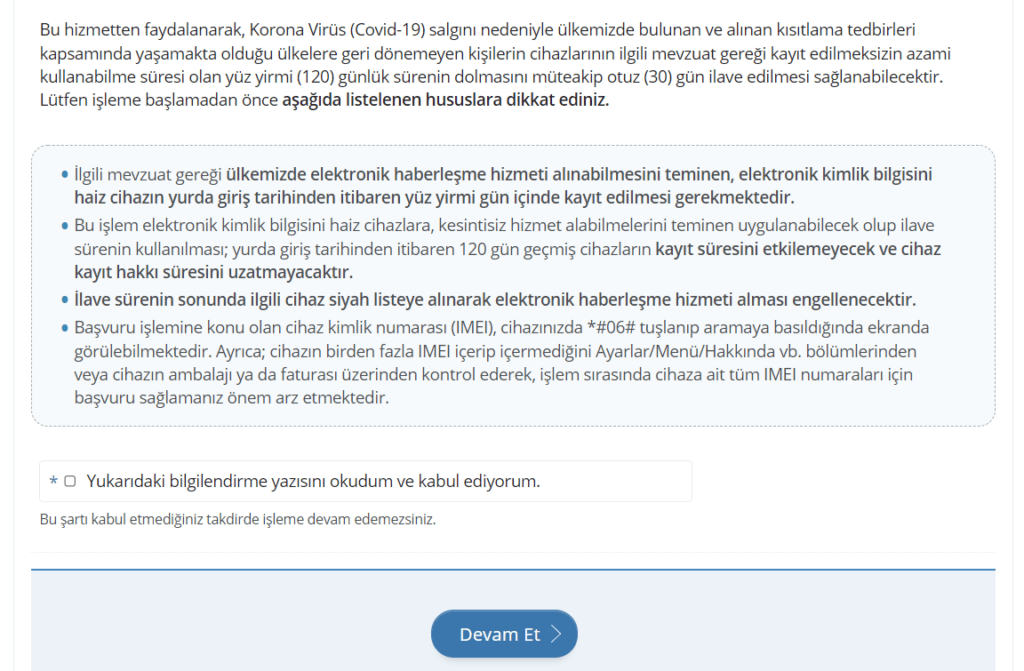
The translation suggests that:
Using this service, people who are in our country because of the coronavirus (Covid-19) epidemic and cannot return to their countries of residence because of restrictive measures taken, receive an additional thirty (30) days after the one hundred and twenty (120) days maximum period of use of their devices without registration expires. Before starting the process, pay attention to the items listed below.
Then there are a few important notices.
1) The communication device must be registered within one hundred and twenty days of entering the country.
Here it might seem that if you run out of 120 days and you extend the unit for another 30 days, that’s 150 days. Which means you will lose the right to register the device!
In fact, machine translation is not entirely correct. It’s just a matter of the device being disabled after 120 days.
And you can register it within 365 days. This is stated on the IMEI registration page.
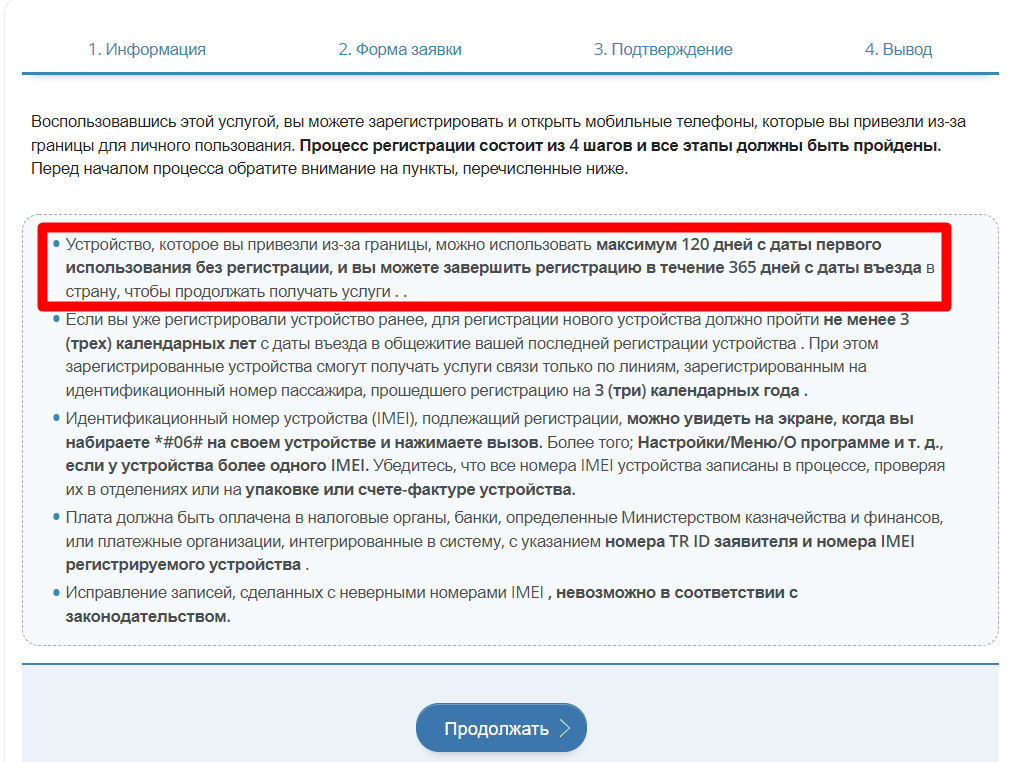
2) The second notice warns that this action does not extend the right to register the device. I.e. you still have to register it within 365 days of entering the country. If you do not do this, the device in Turkey can only be used with a foreign card.
3) Notification 3 says that when the additional period expires, the device will be blacklisted.
4) The last notification tells you to enter all the IMEI of your phone. But we’ll talk about that in the next section.
After reading all the notifications, check the box (there is one at the bottom of the page) and click Devam Et (continue).
5. Entering the IMEI of the phone you want to unlock
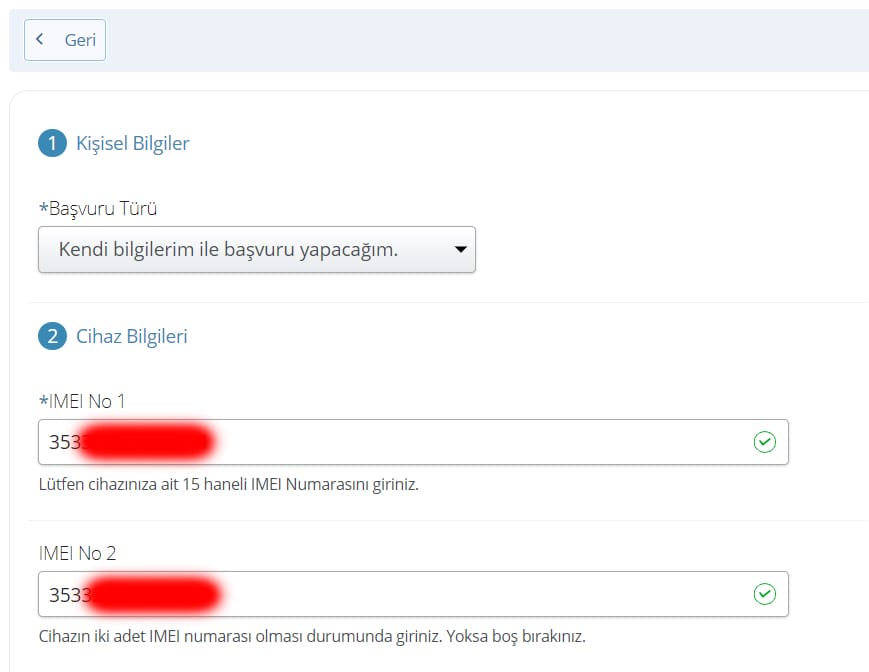
On the next page you will be prompted in point 1 to fill in for whom you are registering the phone:
- For myself (Kendi)
- For your child (Çocuğumun)
And in point 2 you need to enter all the IMEI of your phone. And on the previous page we were urged to enter ALL IMEI.
You can get the IMEI by dialing *#06# on your phone.
Warning! In the IMEI number, that you receive by SMS from YASAYULARI alerting you about the remaining time of use of the phone in Turkey, the last digit is missing!
Therefore, do not copy IMEI number from SMS messages!
In order to find out full and correct IMEI number, dial *#06# on your phone.
Here we need to make a little lyrical digression. Is it necessary to enter all the IMEI or is it enough to enter only the one in which the Turkish SIM card is inserted?
On the one hand, if you enter all the IMEIs of your phone, you will extend the life of them all. On the other hand, we remember that extensions are only available for 30 days. There’s no guarantee that you’ll be able to extend it next time.
You should realize that if you enter all the IMEI, you will lose the opportunity to swap the cards and get another 120 days of free use, since both cards will be registered to the same date!
Personally, I registered both of my cards. But I didn’t plan to swap sims. If the freebie ends, I will register the phone on a full (paid) program with the payment of tax. Because my phone is expensive and it is very important to me. Also, I have two slots in my phone – one physical (SIM), the other virtual (e-SIM). I will not be able to put the card of a Ukrainian operator into e-SIM without coming to Ukraine to do it.
It’s up to you to enter all the cards or just one.
6. Entering the passport data of the phone owner
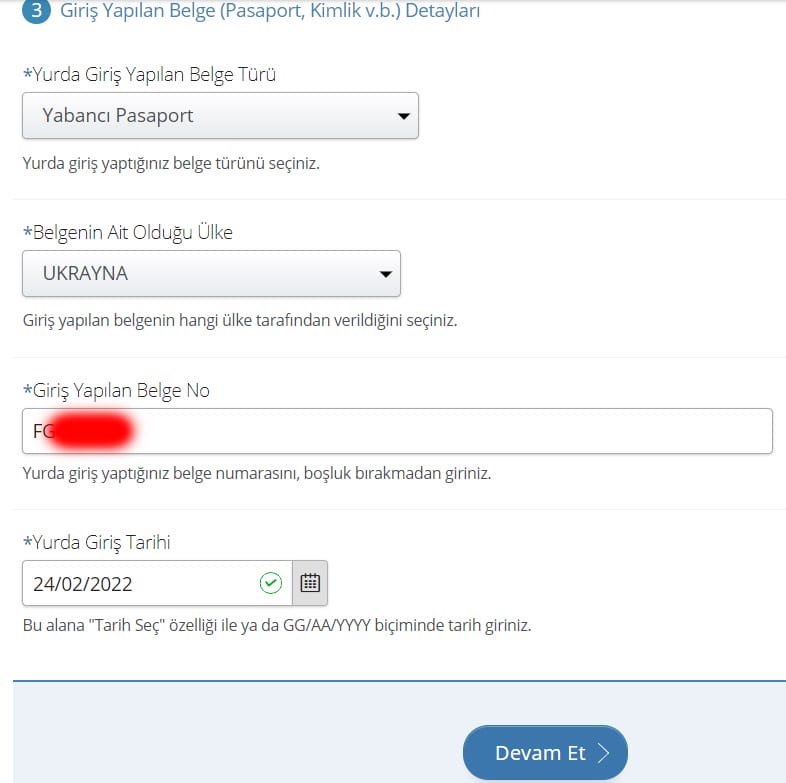
9. Next, on the same page you must select the menu Yabancı Pasaport (foreigner’s passport), Ukrayna (Ukraine), enter your foreign passport number, which you used to enter Turkey and also enter the date of last date of entry into Turkey. The date of the last entry can be seen in the stamps of the Turkish border guards in your passport.
Press Devam Et!
7. IMEI and phone owner verification page
A page opens where you can check the data you entered, including the IMEI.
We ended up in Turkey by accident. On the night of the Russo-Ukrainian war, we flew home from Sri Lanka via Istanbul. Therefore, our date of entry into Turkey: 24.02.2022.

Warning! Check all IMEI very carefully!!! The fact is that Turkish legislation does not provide a procedure for correcting incorrectly entered IMEI codes. And you can only extend one phone this way!!!
Then click the Onayla button and voila!
8. Phone unlock confirmation
You are taken to a page that says “Your unregistered device usage period has been successfully extended.
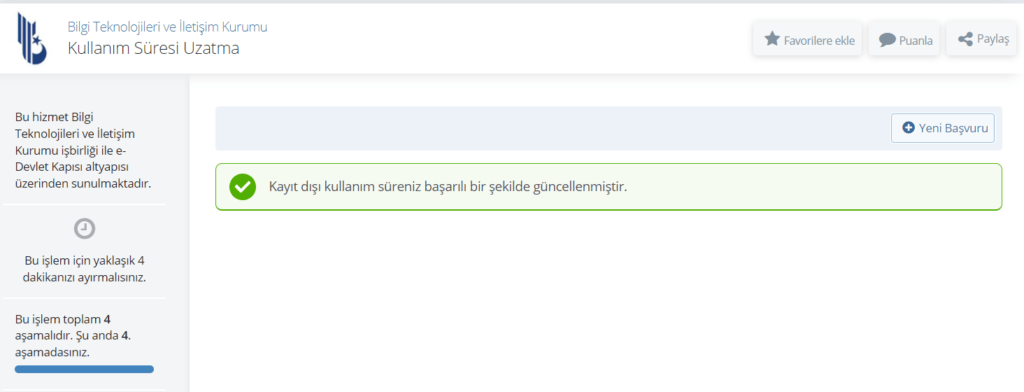
Warning! If your phone was already locked before you started this procedure, it won ‘t start working instantly! Wait until the next morning, reboot your phone and check again!
The result I have
At first I wasn’t sure if the period had been extended. After all, my phone was not blocked. And no text message came. There is no way to check the remaining unregistered period – there is no such service. The phone kept working and kept working.
But just a few days later I received a new message from the addressee YASAYULARI , in which my remaining term was 30 days longer! Cheers!
In the screenshot, you can see that I had 60 days, then 30 days, and then 60 days again.

After that, a month later I was notified again that I had 30 days left. I repeated the procedure again and the deadline was extended again by 30 days. I.e. In this way you can extend the use of the phone for at least 60 days (This is from my experience. And other Ukrainians say that they have been extending their phones this way for two years).
What’s next?
And then I will try and renew the phone as long as the system will allow it. As soon as the “lafa” is over, I will move on to the procedure of official registration of the phone.
In any case, you must remember that the phone can only be registered for 365 days after the date of entry. So how long to renew is up to you.
A reminder that Antalya is a treasure trove of the best locations for photo shoots. Since by fate you were here and managed to unlock your phone, you can celebrate the joyful event by signing up with my wife for a wonderful photo shoot in Antalya at this link.

Problems with unlocking
If you’ve done everything correctly, there shouldn’t be any problems.
However, when unlocking our parents’ phone, we encountered this error.
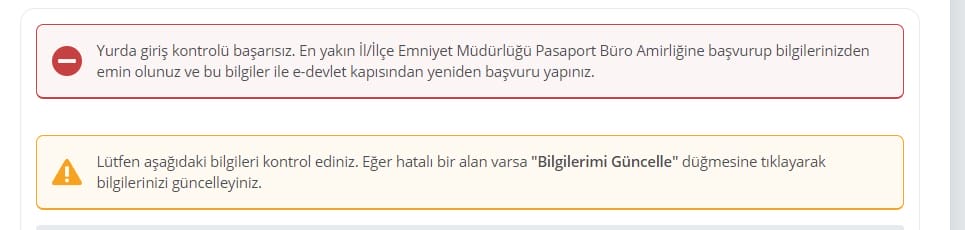
Translated by google, the error sounds incomprehensible:
“Dormitory access control failure. Verify your information by contacting the passport office of the nearest regional/district police department and reapplying through the e-government portal with this information.”
Don’t be frightened! In fact, it’s simple. You entered the date of entry into Turkey incorrectly!
You may have just made a mistake. Or perhaps your case is similar to ours. The point is that we entered the date of the first entry of the parents into the country. But after that they were already leaving and entering back into Turkey. After we entered their last date of entry, which is listed on the stamp in the passport, the phone was successfully renewed!
Check your passport and enter the date of your most recent entry.
If the error repeats, try calling the hotline in Göch 157 (there is an option to select Russian) and verify the date of entry.
I still have questions about unlocking my phone
Ask your questions in the comments below this article. I will try to answer them.
Hi there,
Thanks for explaining this so well !
I have gone through everything correctly, but at the end I see the messages below. It’s about paying for registration.
At the end of this warning there is a “pay now” button
Did you see this too and if so, what did you do?
Below that there is a second button “check my payments”
Please check the above information first. If an error occurred, please go back and correct it. If there is an error or mismatch in the information, your registration will not be completed.
Select a bank from the list below and click the ‘Pay Now’ link next to it.
Your bank’s Internet branch will open in a new window. Complete your payment via the internet branch.
Once you have completed the payment process, click on the “Check my payment” button at the bottom of this page. Your payment will be verified and you will be forwarded to the approval stage to complete your application.
When you click on the ‘Pay Now’ button, you will be redirected to the payment page. Once you have made the payment, you must return to this page, check your payment using the “Check my payment” button and proceed with the transaction.
Thank you in advance,
Regards,
Patrick
Hello Patrick,
Regretfully, the method described in this article is outdated. I have a special warning at the very top of the page in bold font and capital letters.
In order to register your phone now you must go to local tax administration and pay a huge fee there (20.000 TL). I don’t think it worth doing it.
IT DOESNT WORK ANYMORE I HAVE BEEN TRYING
It is true. Regretfully, this method has recently been suspended. We had to pay to the tax administration to clear our phones from customs.
Доброго дня, Сергей
у меня такая проблема: после истечения срока 120 дней мой телефон заблокировали и перестала работать даже украинская сим-карта, теперь я сомневаюсь, что регистрация моего устройства может быть успешной. Странно, что они заблокировали возможность использовать даже иностранную симку((
и как я поняла, что я могу попытаться зарегистрировать телефон в течении 365 с момента вьезда?
Да, если со времени ввоза терминала в Турцию не прошло 365 дней, то Вы можете заплатить за него пошлину (пока еще около 2700 лир) и разблокировать его. К сожалению, статья по платной разблокировке телефона ещё не готова. Если она появится в ближайшие дни, я дам Вам знать.
—
Yes, I confirm that if it has not been 365 days since the telephone was imported into Turkey, you can pay the duty for it (so far about 2700 TL) and unlock it. Unfortunately, the article on paid phone unlocking is not ready yet. If it appears on the web site in the next few days, I will let you know.